Admin Guide Overview
The Forja admin dashboard is a React-based single-page application that gives you full control over your sites, content, media, and settings. It is accessible at /dashboard in production and at localhost:5173 during local development.
Accessing the Dashboard
Open your browser and navigate to the dashboard URL. If you are not signed in, you will be redirected to the login page at /dashboard/login. Once authenticated via Clerk, you land on the home dashboard.
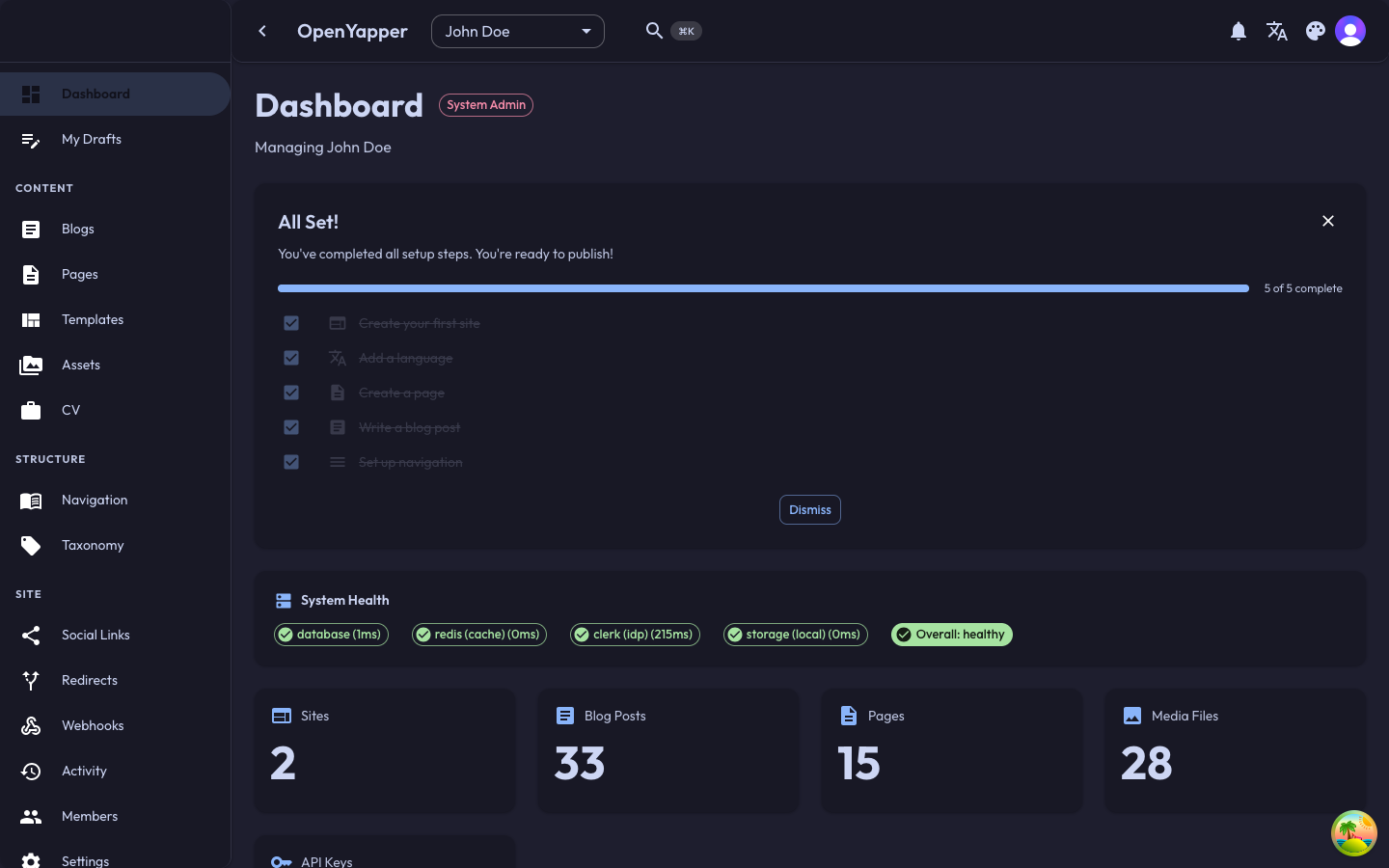
Layout
The admin interface follows a standard three-zone layout:
┌─────────────────────────────────────────────────────────┐
│  Top bar: site selector, search, theme toggle, profile  │
├──────────┬──────────────────────────────────────────────┤
│          │                                              │
│ Sidebar  │              Main content area               │
│          │                                              │
│  - Home  │                                              │
│  - Sites │                                              │
│  - Blogs │                                              │
│  - Pages │                                              │
│  - ...   │                                              │
│          │                                              │
├──────────┴──────────────────────────────────────────────┤
│  Status bar / footer                                    │
└─────────────────────────────────────────────────────────┘
Top Bar
The top bar contains:
- Site selector -- a dropdown that lets you switch between the sites you manage. Most content operations are scoped to the currently selected site.
- Command palette trigger -- click the search icon or press
Cmd+K(macOS) /Ctrl+K(Windows/Linux) to open the command palette for quick navigation. - Theme toggle -- switch between dark and light mode. Your preference is persisted in local storage.
- Language switcher -- change the admin UI language. This does not affect your content locales.
- Notifications bell -- shows unread notification count. Click to view and manage notifications.
- Profile avatar -- click to access your profile page or sign out.
Sidebar Navigation
The sidebar organizes all features into logical groups:
| Group | Pages |
|---|---|
| Overview | Dashboard |
| Content | Blogs, Pages, Documents, Legal, CV |
| Media | Media Library |
| Structure | Navigation, Taxonomy, Social Links |
| Integration | Webhooks, Redirects, Content Templates |
| Configuration | Locales, Settings |
| Access | API Keys, Members, Clerk Users |
| Activity | Audit Log, Notifications |
The sidebar is collapsible. On smaller screens it automatically collapses to icon-only mode.
Main Content Area
The main content area renders the page you selected from the sidebar. Most pages follow a list-detail pattern: a table or grid listing records on the left, and a detail/edit view when you select or create a record.
Site Context
Forja is a multi-site CMS. Before you can manage content, you need to select a site from the site selector in the top bar. All content operations (blogs, pages, media, navigation, etc.) are scoped to the currently active site.
If you have not created any sites yet, the dashboard will guide you through the setup process.
Keyboard Shortcuts
| Shortcut | Action |
|---|---|
Cmd+K / Ctrl+K | Open command palette |
Theme Support
The dashboard supports both dark mode and light mode. Toggle between them using the sun/moon icon in the top bar. Your preference is saved and will persist across sessions.
Next Steps
- Authentication -- learn about signing in, signing up, and role-based access.
- Dashboard -- explore the home dashboard and its widgets.
- Sites -- create and manage your sites.